> For the complete documentation index, see [llms.txt](https://help.sdocs.com/llms.txt). Markdown versions of documentation pages are available by appending `.md` to page URLs; this page is available as [Markdown](https://help.sdocs.com/sdocs/automation-and-document-lifecycle/workflows/lightning-web-security-and-content-delivery-network.md).
# Lightning Web Security and Content Delivery Network
Enable these two Salesforce org settings before users work with the S-Docs Lightning components.
They affect how Salesforce loads component code and how that code runs on the page.
If either setting is off, users can see slow loads, inconsistent component behavior, or missing actions.
***
### Why these settings matter
#### Lightning Web Security
Lightning Web Security is Salesforce's current client-side security model for Lightning components.
S-Docs Lightning components depend on this runtime to behave predictably inside Lightning pages.
When it is enabled:
* component code runs in the supported security model
* interactions with other Lightning page elements are more consistent
* users are less likely to hit rendering or runtime issues
When it is disabled:
* components may load inconsistently
* actions may not behave as expected
* troubleshooting becomes harder because the page is not using Salesforce's standard LWC security model
#### Content Delivery Network (CDN) for Lightning Component Framework
This setting controls how Salesforce serves the Lightning framework files used by the page.
When it is enabled:
* Lightning assets load faster
* component initialization is more reliable
* users, especially remote or Experience Cloud users, usually see better page performance
When it is disabled:
* framework files can take longer to load
* S-Docs components may feel slower to initialize
* first-load performance issues are more likely
***
### How to correct the issue
{% stepper %}
{% step %}
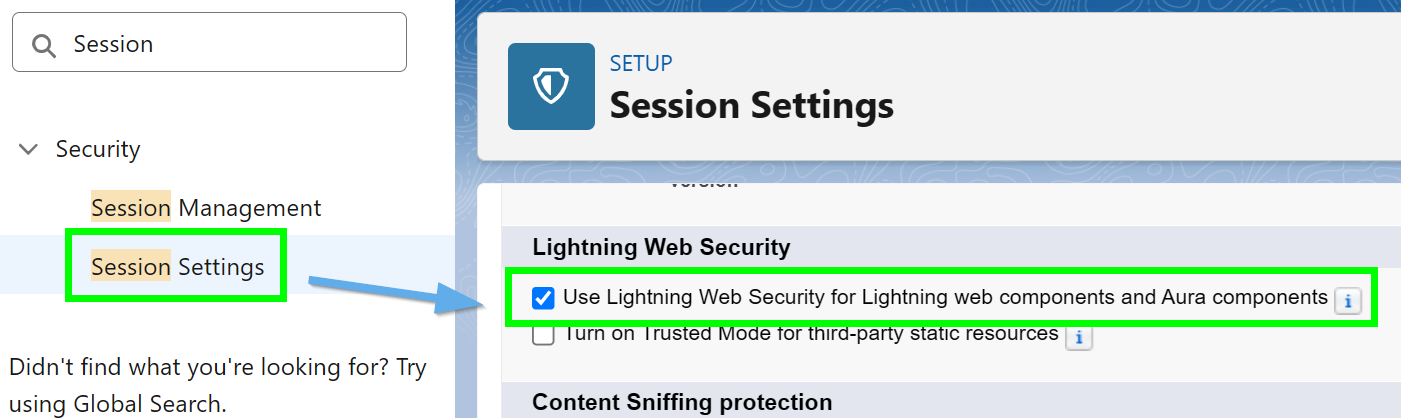
### Open Session Settings
In Salesforce Setup, enter `session` in **Quick Find**.
Open **Session Settings**.
{% endstep %}
{% step %}
### Enable Lightning Web Security
Scroll to the **Lightning Web Security** section.
Enable **Use Lightning Web Security for Lightning web components and Aura components**.
{% endstep %}
{% step %}
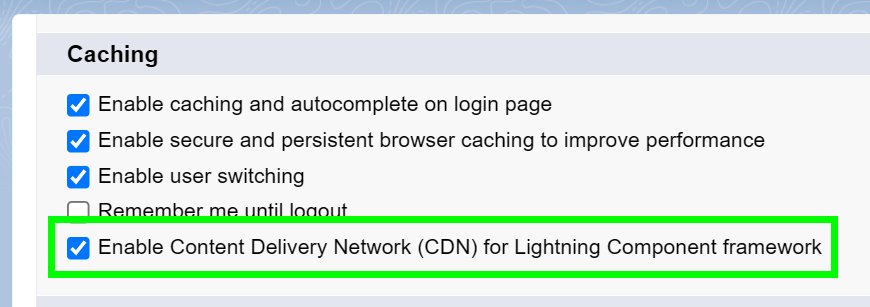
### Enable the Lightning CDN setting
Scroll to the top of the page.
Enable **Content Delivery Network (CDN) for Lightning Component framework**.
{% endstep %}
{% step %}
### Save and retest
Click **Save**.
Refresh the Lightning record page that contains the S-Docs components.
Then verify that:
* **Generate Documents (S-Docs)** loads templates
* **Documents (S-Docs)** loads generated files
* actions such as preview, email, refresh, or versions behave normally
{% endstep %}
{% endstepper %}
### If the concern remains
Check these common follow-up items:
* both S-Docs components use the same **Object API Name**
* the components are placed on the correct record page
* the user has access to the required templates and generated documents
If you are configuring this for an Experience Cloud site, also review [Configuring S-Docs Lightning Web Components in Experience Cloud](broken://spaces/WKNnJmhJBQwhdk5WBFsi/pages/iBfBHJQCeShUKYBee1ey).
{% hint style="info" %}
These are Salesforce org-level settings.
After changing them, test with the same user profile that reported the issue.
{% endhint %}
---
# Agent Instructions
This documentation is published with GitBook. GitBook is the documentation platform designed so that both humans and AI agents can read, navigate, and reason over technical content effectively. Learn more at gitbook.com.
## Querying This Documentation
If you need additional information that is not directly available in this page, you can query the documentation dynamically by asking a question.
Perform an HTTP GET request on the current page URL with the `ask` query parameter, and the optional `goal` query parameter:
```
GET https://help.sdocs.com/sdocs/automation-and-document-lifecycle/workflows/lightning-web-security-and-content-delivery-network.md?ask=&goal=
```
`ask` is the immediate question: it should be specific, self-contained, and written in natural language.
`goal` is optional and describes the broader end goal you are ultimately trying to accomplish on behalf of the user. GitBook uses it to tailor the answer towards what is most useful for that goal.
The response will contain a direct answer to the question and relevant excerpts and sources from the documentation.
Use this mechanism when the answer is not explicitly present in the current page, you need clarification or additional context, or you want to retrieve related documentation sections.